
🎯 The core idea
A WARDOGS HOTAS works, but it's an unofficial setup: the game has no HOTAS section, so the stick, throttle and pedals go through the controller axes, with free look added by a remapping tool. Start cheap with a twist stick, keep deadzones tiny, then learn to hover before anything else. The helicopter keeps moving while the stick is off-centre, so small inputs that return to centre win. Season 02 changed nothing here.
- free costs nothing
- cheap small cost
- setup needs preparation
- grind pays off slowly
- skip the thing to stop doing
This guide covers flying WARDOGS with a HOTAS (hands on throttle and stick): which flight stick to buy, how to mount it next to your keyboard, how binding works, and the first training drills. The flight lessons come from Sim Controls' 37-minute basic training video (recorded on a VKB Gladiator stick and a Thrustmaster TWCS throttle, uploaded 21 September 2026). The hardware and mounting advice comes from IceManIsaac's 38-minute HOTAS rig tour (30 September 2026). Both were checked against the official WARDOGS patch notes. Keyboard, mouse and gamepad layouts are in the WARDOGS helicopter controls guide, and more guides are on the WARDOGS game hub.
How a HOTAS maps to the four flight controls

Sim Controls splits flying into four inputs, and a HOTAS gives each one its own physical control:
| Input | What it does | On a HOTAS | Keyboard equivalent (HUD prompt) |
|---|---|---|---|
| Pitch | Nose forward or back | Stick forward/back | W / S |
| Roll | Tilts the helicopter left or right | Stick left/right | A / D |
| Yaw | Swings the tail rotor so the nose turns flat | Stick twist, throttle rocker or pedals | Q / E |
| Collective | Climbs or descends | Throttle lever | Left Shift up, Ctrl down |
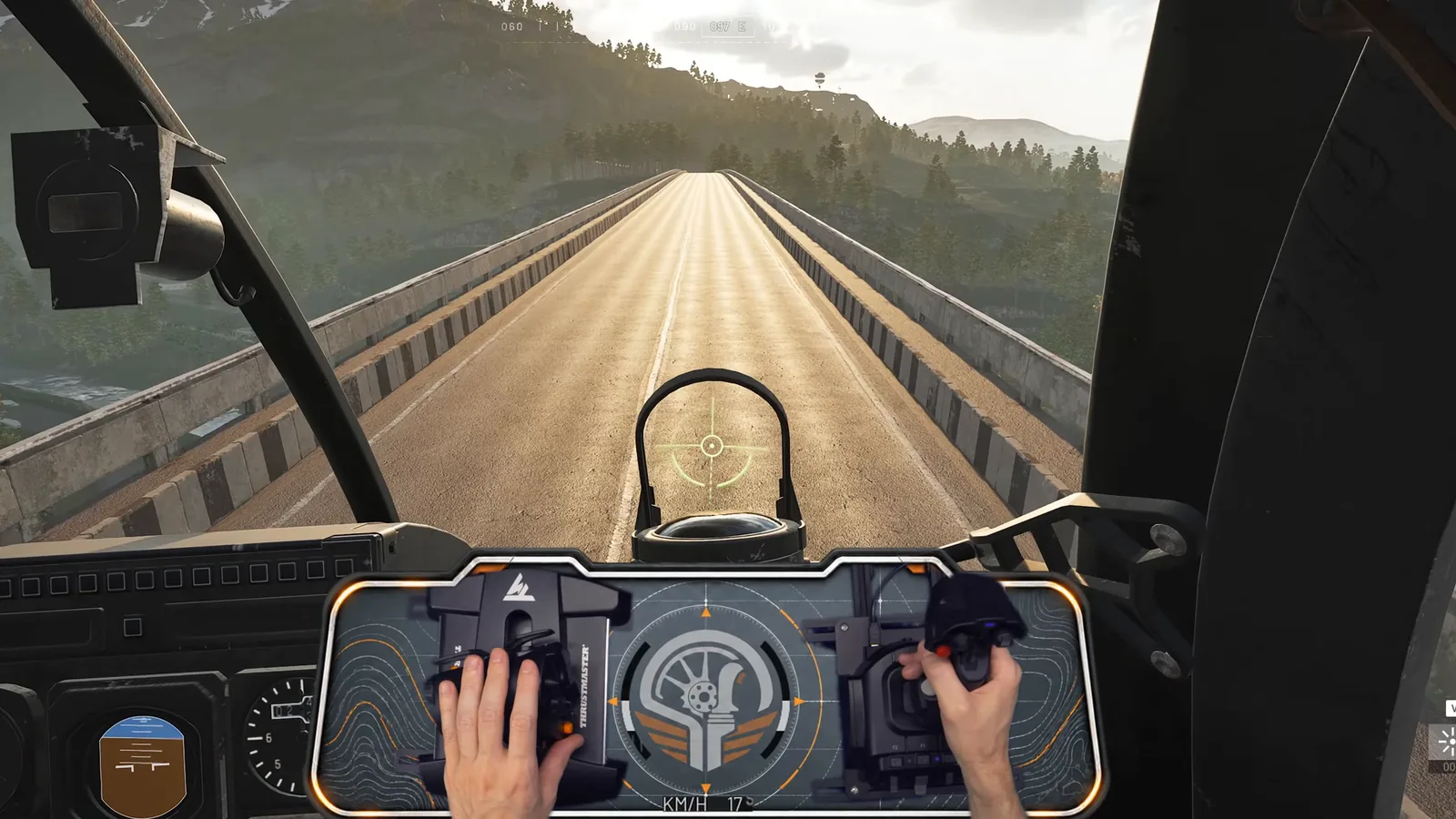
In the footage his throttle sits on the left and the stick on the right, the usual layout for a right-handed pilot. The point he repeats all video is that the four inputs always work together: every change to one of them changes what the others need to do.
WARDOGS joystick support: what the game officially offers

Be clear about the starting point. WARDOGS joystick support isn't advertised anywhere official: the Steam store page lists no controller support at all, the WARDOGS wiki FAQ says controller support is limited in the current version, and no patch note mentions HOTAS, flight sticks or joysticks. The only official line that touches it is in the launch changelog (9 September 2026): helicopter input damping now applies to every input device, so a stick gets the same smoothing as a keyboard or pad.
In practice sticks do work. As covered in the helicopter controls guide, the gamepad settings hold flight-stick axes for cyclic, yaw, collective and free look, each with its own sensitivity, deadzone and invert switch, plus a Self-Centering Collective option. The HUD in Sim Controls' footage still shows keyboard prompts while he flies the stick (Collective Lift on Left Shift, Collective Descent on Ctrl, Deploy Flares on V, Lock on L, Change Seat on O), which is a handy list of the buttons worth moving onto the stick.
Picking a flight stick: from $35 to force feedback

cheap IceManIsaac's advice for a first WARDOGS flight stick is to buy cheap, find out whether you like flying this way, then build up piece by piece. The prices below are what his video showed on 30 September 2026, so check current ones:
| Option | What you get | Notes from the video |
|---|---|---|
| Logitech Extreme 3D Pro ($34.99 shown) | Pitch, roll, twist for yaw, a small throttle lever and buttons on one stick | His pick for trying a HOTAS at all; you can fly WARDOGS on it alone |
| Thrustmaster T16000 (stick + throttle) | Throttle with a rocker you can use for yaw; Isaac believes the stick uses Hall-effect sensors | Long-standing starter set; some people buy only the throttle |
| VKB Gladiator + Thrustmaster throttle | A better stick with a separate throttle | A common starter pairing; Sim Controls flies a Gladiator with a TWCS |
| MOZA AB6 bundle | Force-feedback base, stick and desk clamp in one box | What he'd buy if it weren't his job |
| MOZA AB9 base ($499 shown) + stick, MTP throttle ($299 shown) | His own rig, bought piece by piece | Expensive; the base and clamp are sold separately |
He also passes on a reviewer's warning about quality control on the Logitech X52 and X56, though he hasn't used them himself. Cheap sticks use potentiometers that wear over time; Hall-effect sensors don't.
Force feedback doesn't work as real game feedback in WARDOGS. A force-feedback base can only fake spring and damper forces through its own software, which is still useful (see the curves section).
Yaw: twist stick, throttle rocker or rudder pedals

Yaw is the input most new pilots skip, and it's the one you'll fight with on hardware. You have four ways to give it:
- Twist grip (a Z-axis stick, or a twist module): cheapest, but you're rolling and twisting the same hand at once.
- Throttle rocker: the Thrustmaster throttle option, good if you sit on full collective a lot.
- Rudder pedals: gradual input and your hands stay free. Isaac locked the twist on his stick once he bought pedals.
- Foot switches such as an Elgato foot pedal: they work, but each press is either zero or full yaw, with nothing in between.
setup His best upgrade was a hydraulic damper on the pedals (about $65 extra on his MOZA pair). Without it the springs snapped the pedals back and his minigun aim over-corrected; with it, fast movements meet resistance and the pedals return slowly.
Mounting the rig beside your keyboard

WARDOGS is mostly infantry play, so a rig that blocks your keyboard and mouse is a problem. Isaac tried the usual sim setups (stick between the legs, stick on the desk) and dropped both: one hit his chest when he went back to mouse and keyboard, the other ate his mouse space.
What he settled on:
- Stick and throttle clamped off to each side of the desk, so he leans back to fly and leans in to play infantry.
- A heavy table clamp for the stick base; a generic desk clamp is enough for the throttle. Quick-release mounts let him remove both for a tournament.
- Weight behind the pedals (he uses about 90 lb of bumper plates), because pushing yaw slid the whole setup away.
- A chair that can't move: lockable casters to stop it rolling and straps to stop it swivelling.
free He also removed the throttle's detent, because no WARDOGS helicopter has detents that match it.
Curves, deadzones and centring springs

setup Calibrate the stick in its own software first (MOZA, VKB, Thrustmaster and Logitech all have one), then set the WARDOGS axes. On a force-feedback base you also choose how it centres: Isaac runs the spring force at 30, where the stick comes back gently. At 100 it snaps back hard; at 0 it stays where you leave it. A damper setting adds resistance the faster you move.
Inside the game, the values from Isaac's earlier tutorial are roll sensitivity at 1 and very small deadzones (0.02 on yaw and 0.01 on collective in his menus). Keep deadzones small: as the training below shows, the helicopter reacts to tiny off-centre inputs anyway. Sim Controls points out that sticks with centring springs make hovering easier, because the spring finds neutral for you.
Binding free look, lock and flares to the stick

There's no free-look button in the flight-stick list. Isaac's workaround was Joystick Gremlin, a free remapping tool: he mapped a throttle button to Left Alt, the keyboard free-look key, and bound his door lock to a throttle button too.
You don't need much on the stick. Isaac's list is short: lock and unlock the doors, reload, and cargo drop if you fly logistics. Flares (V on the keyboard) are worth a button too. Bind those to buttons you can reach without letting go of the stick or throttle, and leave the rest on the keyboard.
skip Don't toggle Freelook On By Default. Isaac hit a bug in the beta where turning it on once made every air vehicle start in free look, and he had to press the free-look button twice each time to clear it.
First drill: find centre and hold a hover

free Practise in the firing range, where the helicopter costs nothing to crash. Sim Controls' first lesson in order:
- Find the stick's centre position before you touch anything else.
- Raise the collective slowly, just until the skids lift. Then leave it there, or lower it a little if you keep climbing.
- Look at the horizon, not the instruments, and make tiny corrections that return to centre each time.
His estimate is that a stable hover sits at roughly 30 to 40% of collective travel, but that's his stick, not an official number. Don't move on until you can hold the hover: coming back to a neutral hover from forward flight is harder than holding one.
Pitch trades altitude for speed

From a hover, push the nose forward a little without touching the collective. You'll gain speed and lose height: in his demo the skids hit the bridge deck without any change to the collective. That's the first trade-off to learn. Nose forward swaps altitude for speed; nose up to slow down and you'll balloon slightly before settling back into the hover.
setup If you're sinking and already at full collective, the only fix left is to reduce the pitch. If you still have collective in reserve, a bit more gives an instant climb at the same nose angle.
Reading the attitude indicator

The round instrument on the left of the Little Bird panel is an attitude indicator (an artificial horizon): blue is sky, brown is ground. Sim Controls uses it to show what a steady hover looks like. The line between blue and brown sits in the middle, matching the horizon out of the window. Point the nose down and the gauge fills with brown; point it up and it goes blue.
You won't watch it in combat, but in training it shows why you're climbing or sinking. Below it, the HUD speed readout in km/h tells you how much speed each pitch change buys.
Turning without losing height

Rolling into a turn tilts some of your lift sideways, so a level turn needs more collective. Sim Controls' demo off a bridge shows it: hold neutral collective, roll, and you drop toward the trees. Roll and add collective together and the turn stays level. The steeper the bank, the more collective it needs, and past a certain bank you'll sink even at full collective.
He builds a faster turn in three layers:
| Layer | Input | Effect |
|---|---|---|
| 1 | Roll only, then neutralise | Slow, wide turn |
| 2 | Roll plus pulling the pitch back | Much quicker rotation |
| 3 | Roll, pitch back and yaw into the turn | Flicks the tail around fastest |
grind Every layer costs speed or height. A gentle turn at about 220 km/h actually built speed to around 240 km/h as he gave up a little altitude. His hardest turn at full collective bled so much speed that it took a long time to recover. For evading missiles he prefers the gentle turn that keeps speed. The full combat side is in the WARDOGS helicopter guide.
The point-to-point hover drill

This is the drill Sim Controls says helps with everything: landings, hovers, precision and confidence.
- Pick two spots, for example a rooftop and a rock, with obstacles between them if you like.
- Hover over the first for 5 to 10 seconds until you're stable.
- Fly to the second as fast as you can without gaining or losing height, using every control.
- Bleed off speed early and stop in a hover over it without overshooting. Then fly back.
grind Overshooting is expected at first: he overshot on his first pass and nailed the second. Starting to lower the collective early is what fixes it.
Beginner HOTAS mistakes to stop making

skip The five habits Sim Controls sees most often:
- Over-correcting. A big correction needs an equally big correction back, and you start oscillating. Make small inputs and return to centre.
- Holding the stick off-centre. In WARDOGS even a 1% held input keeps the attitude changing until you nose over. In some other helicopter sims a held stick holds the attitude. Here it doesn't, so centre is where your hand lives.
- Ignoring the collective. Sitting at 100% collective makes you balloon on approach. Lower it earlier than feels right, especially when landing.
- Chasing a perfect hover. Aim for control, where every input does what you expect. Springs make it easier, and precision comes later.
- Trying J-hooks and hard manoeuvres too early. He crashed J-hooks he hadn't practised. Learn them offline, not in a live match.
What Season 02 changed for HOTAS pilots

Both videos are from the Season 01 build: Sim Controls' training on 21 September and Isaac's rig tour on 30 September, both after launch and before Season 02 (Update 0.2.0, live 15 October 2026). The Season 02 patch notes have no change to the flight model, the flight-stick axes or helicopter input. The Season 02 preview promised better "vehicle handling", but the handling changes in the notes are for ground vehicles only (tracked vehicles, the Humvee and the Dune Buggy). Everything in the drills above still applies.
What did change around your flying:
| Season 02 change | Why it matters to a stick pilot |
|---|---|
| Little Bird AH-6M [Miniguns] unlocks at Pilot level 8 (was 4), costs $125k to unlock (was $50k) and $12,000 at the vendor (was $7,000) | The helicopter in Sim Controls' footage is now a later, pricier unlock, so train in the firing range |
| Calibre damage reductions also hit the Little Bird and Lakota miniguns | Gun runs need more time on target |
| Little Bird AH-6R [Rockets] vendor price 2,500 → 8,800 | The rocket Little Bird in Isaac's gameplay costs more to lose |
| Cockpit glass works both ways | Passengers shooting out through it damage your helicopter |
| Fixed the vehicle spinning on gamepad after closing the tac map; fixed vehicle-weapon ADS on controller | Gamepad fixes only; nothing in the notes names flight sticks |
| Basic Parachute $100 → $500, won't open below about 10 m | Bail-outs need height |
Read next
- WARDOGS helicopter controls for mouse, keyboard and controller
- WARDOGS helicopter guide: flying, surviving and getting kills
- WARDOGS Season 2: every change and patch note
- WARDOGS XP: levelling the Pilot track and every class
- WARDOGS best settings for visibility and FPS
How this guide was fact-checked
- Official Steam announcements (WARDOGS app 1867240): the Pre-Load Live & Season 1 Changelog (9 September 2026) for input damping on every device, and the Season 02 Patch Notes (14 October 2026) for the Little Bird unlock and price changes, calibre reductions, cockpit glass, parachutes and gamepad fixes. No announcement up to Season 02 mentions HOTAS, flight sticks or joysticks. The Season 02 Preview's "vehicle handling" line was checked against the notes, which only change ground vehicles.
- Steam store data and the WARDOGS Fandom wiki FAQ: no controller support listed on the store; the wiki says controller support is limited.
- On-screen in the videos: the HUD key prompts, the AH-6M [Miniguns] label, the attitude indicator, the km/h speed readout, the HOTAS hand-cam and the hardware prices on the product pages Isaac showed.
- Attributed, not official: the 30–40% hover collective, the 220 to 240 km/h turn, and the 1% held-input behaviour come from Sim Controls' demonstration. The hardware picks, damper, mounting and Joystick Gremlin workaround are IceManIsaac's. The in-game axis values (roll sensitivity 1, deadzones 0.01–0.02) and the free-look bug are from his earlier pilot tutorial, used in the helicopter controls guide.
- Corrections: Sim Controls asks what the blue-and-brown gauge is called; it's an attitude indicator. The AH-6M [Miniguns] he flies is now a Pilot level 8 unlock at $12,000, not the Season 01 level 4 and $7,000 (the wiki's vehicle table still shows $7,000).
What this guide doesn't answer
- Exact per-button bind files: neither video publishes a full in-game bind list, and both creators keep their curves in separate videos.
- Landings and J-hooks: Sim Controls covers them in a later lesson, and this guide stops at basic flight.
- Missiles, flares and gun runs: those are combat flying, in the WARDOGS helicopter guide.
- Keyboard, mouse and gamepad layouts: covered in the helicopter controls guide.
- Console or VR flight sticks: WARDOGS is PC-only in Early Access, and consoles are planned for 2028 per the wiki FAQ.
Frequently asked
Does WARDOGS support HOTAS and flight sticks?
Not officially. The Steam store lists no controller support, the WARDOGS wiki says controller support is limited, and no patch note mentions HOTAS. Flight sticks still work through the flight-stick axes in the gamepad settings (cyclic, yaw, collective and free look, each with sensitivity, deadzone and invert), and since launch helicopter input damping applies to every input device.
What is the best cheap flight stick for WARDOGS?
IceManIsaac recommends starting with a Logitech Extreme 3D Pro (shown at $34.99). It has pitch, roll, a twist grip for yaw, a small throttle lever and buttons, so you can fly WARDOGS on it alone. A Thrustmaster T16000 or a VKB Gladiator with a Thrustmaster throttle are common next steps; force-feedback bases only fake spring and damper forces in WARDOGS.
How do I set up free look on a joystick in WARDOGS?
There's no free-look button in the WARDOGS flight-stick list. IceManIsaac maps a throttle button to Left Alt, the keyboard free-look key, with the free tool Joystick Gremlin. Leave Freelook On By Default off: in the beta, turning it on once made every air vehicle start in free look.
What joystick deadzone and sensitivity should I use in WARDOGS?
Keep deadzones very small. IceManIsaac runs roll sensitivity at 1, a yaw deadzone of 0.02 and a collective deadzone of 0.01. Calibrate the stick in its own software first. Small deadzones matter because the helicopter keeps changing attitude even with a 1% held input, so you need to feel the centre.
Did Season 2 change HOTAS or flight stick controls in WARDOGS?
No. The Season 02 patch notes (Update 0.2.0, 15 October 2026) don't change the flight model, the flight-stick axes or helicopter input, and the vehicle handling changes are for ground vehicles only. They do move the Little Bird AH-6M [Miniguns] to Pilot level 8 at $12,000, make cockpit glass work both ways and fix some gamepad vehicle bugs.
Read next
WARDOGS Helicopter Controls: Best Mouse and Controller Setup
How to set up WARDOGS helicopter controls on mouse and keyboard or a controller: the default rotary keybinds, Rotary Vehicle Mouse Control settings, which flight assists to start with, and takeoff and landing habits. Checked against the launch and Season 02 patch notes.
WARDOGS Helicopter Guide: Fly, Survive and Get Kills
How to fly a WARDOGS helicopter in combat and stay alive: which airframe fits which job, fast troop landings, killing CIWS and Talon operators from above, flares and ground checks, and beating enemy pilots. Checked against the Season 02 patch notes.
WARDOGS Vehicle Weak Points: Where to Hit Every Vehicle
Where to hit each WARDOGS vehicle and how many rockets it takes, from a Season 01 weak point test, with the Season 02 prices, unlocks and kill rewards checked against the patch notes.
WARDOGS SAM Site Guide: How to Build Anti-Air That Works
How to build a Talon 9K-SAM anti-air site on a walled recon tower that snipers, Urals and rockets struggle to break, and how Season 2's reload and restock changes cut two ammo pallets from about 75 missiles to 18. Also compares the Talon with the CIWS, Verba and new Gepard.