
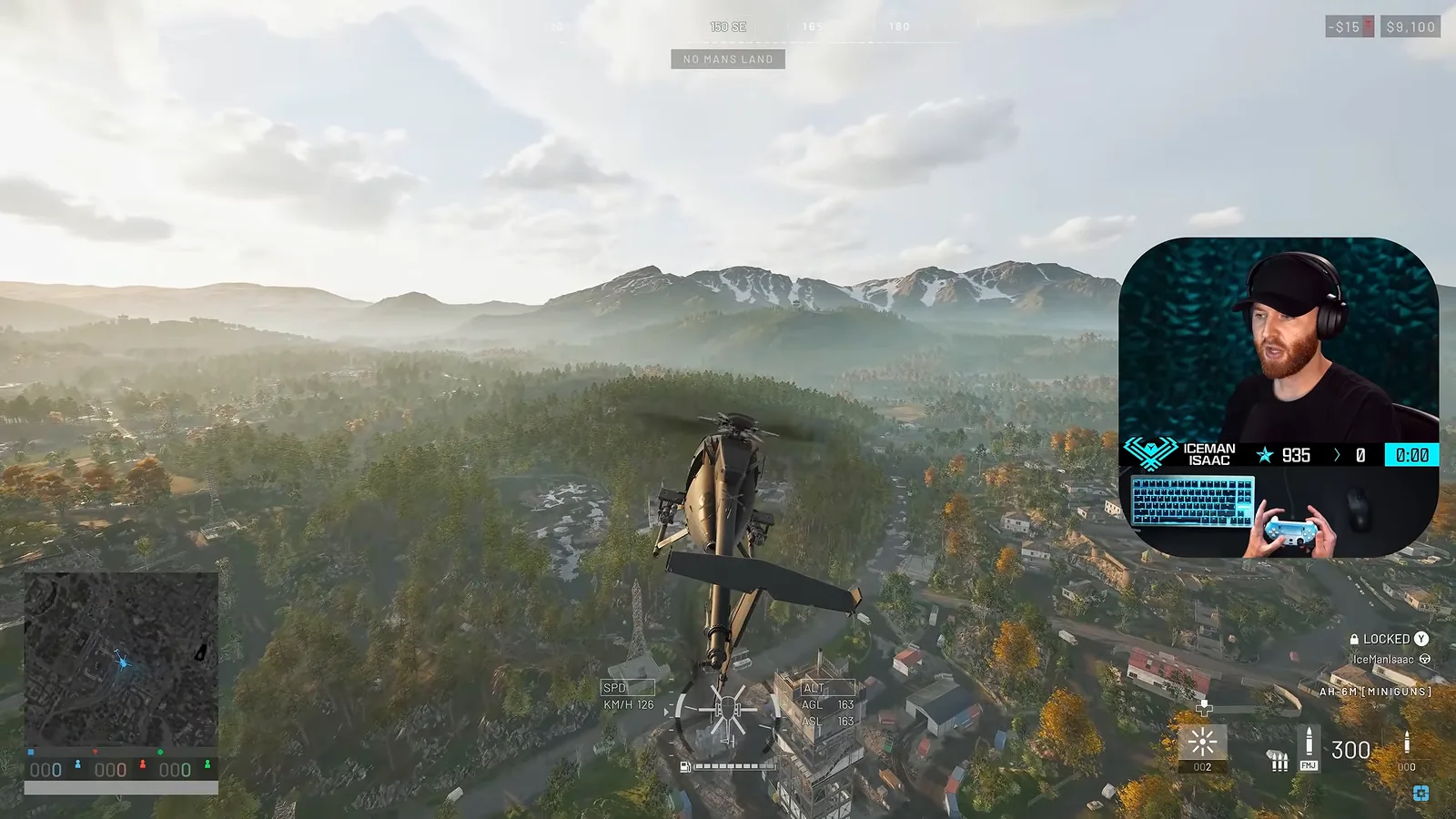
🎯 The core idea
Good WARDOGS helicopter controls come down to three things: fly the keys for big moves and the mouse for fine ones, start with only Stability Assist and Turn Coordination switched on, and learn to use yaw on purpose. On a controller the collective sits on the triggers and yaw on the bumpers. Season 02 did not touch the flight model, so this setup from a pre-launch video still holds.
- free costs nothing
- cheap small cost
- setup needs preparation
- grind pays off slowly
- skip the thing to stop doing
This guide covers WARDOGS helicopter controls and settings for mouse and keyboard and for a gamepad. It's based on IceManIsaac's 34-minute pilot tutorial (he's a former US Air Force instructor pilot, and he recorded it just before the second beta weekend), checked against the official WARDOGS patch notes. If you fly with a flight stick and throttle, the full setup lives in the flight stick and throttle guide. Combat flying, flares and staying alive over the control zone are covered in the combat flying guide. More WARDOGS guides are on the WARDOGS game hub.
Practice in the firing range first

free Open the firing range from the main menu and talk to the NPC there to get a Little Bird you can crash for nothing. Isaac's advice is to learn your controls here, not with a helicopter your squad paid for. Helicopters in a live match cost real in-game money: in Season 02 the armed Little Bird AH-6M [Miniguns] sells for $12,000 at the vendor and unlocks at Pilot level 8, as covered in the WARDOGS Season 2 changes.
He also has a view on which airframe teaches you most. Heavy helicopters are slower and more sluggish, so if you can fly one you can fly the Little Bird easily. He liked the attack helicopter but warned that the transport helicopter overcorrected badly in the beta. The launch changelog later gave the Z20 Lakota a balance pass and a fix for sluggish pitch, so that warning is older than the current build.
Cyclic, collective and yaw: the three flight controls

Every scheme in WARDOGS maps the same three controls. Isaac uses fixed-wing words (stick, throttle, rudder) because most players know them better, and so does this guide.
| Control | Helicopter name | What it does | Default key | Controller |
|---|---|---|---|---|
| Stick | Cyclic | Pitch (nose up/down) and roll (bank left/right) | W/S pitch, A/D roll | Left stick |
| Throttle | Collective | Climb and descend (more or less lift) | Left Shift up, Ctrl down | RT up, LT down |
| Rudder | Anti-torque / yaw | Turns the nose left or right without banking | Q/E (per the video) | LB/RB |
Roll and yaw are not the same thing. Roll tips the helicopter onto its side; yaw swings the nose flat, like turning your head. Mixing them up is the most common reason new pilots can't hold a line.
Default mouse and keyboard helicopter keybinds

The flight keys sit under Rotary Vehicle Keybinds in the controls menu, below the ground vehicle binds. The list in the video shows:
- Collective (Raise): Left Shift. Collective (Lower): Ctrl. Isaac points out this matches sprint and crouch, so your fingers already know it.
- Increase / Decrease Cyclic X: W and S. W pushes the nose down to fly forward, S pulls it up.
- Increase / Decrease Cyclic Y: D and A, roll right and left.
- Yaw Left / Yaw Right: Isaac says these are normally Q and E, but the bindings screen he shows lists them on the comma and period keys. Check your own list and put yaw somewhere your hand can reach while it holds Shift.
setup His own change: yaw goes on an Elgato foot pedal, one pedal for each direction, so his left hand only handles Shift, Ctrl and W/A/S/D. Some pilots instead roll and yaw at the same time with one wide finger press (D and E together). Pick whichever you can do without thinking.
Rotary vehicle mouse control settings

setup Under Mouse - Vehicle you'll find Rotary Vehicle Mouse Control ("alter the ability to control a rotary vehicle using mouse input"). Isaac recommends turning it on, with a catch: keys are all or nothing, either no roll or full roll, while the mouse gives partial input. So fly the big moves on the keys and use the mouse for the fine work, like holding a gun run steady or setting down gently.
These are the helicopter settings his menu shows:
| Setting | Value in the video | What to do with it |
|---|---|---|
| Rotary Vehicle Mouse Control | Enabled | Turn on |
| Helicopter Mouse Swipe Left/Right | Roll | Keep roll on the mouse's side-to-side |
| Helicopter Mouse Swipe Up/Down | Pitch | Keep pitch on forward-back |
| Helicopter Mouse Pitch / Roll Sensitivity | 50% / 50% | Start here, lower it if the nose jumps |
| Helicopter Mouse Axis Isolation | 0% | Raise it if pitching also rolls you |
| Air Vehicle Multiplier | 1.00 | Leave it unless the mouse feels slow |
| First / Third Person Free Cam Sensitivity | 150 / 150 | Personal taste |
| Freelook On By Default | Disabled | Keep it off (see below) |
The sensitivity numbers are Isaac's, not a fixed best. The best helicopter controls are the ones where a small hand movement gives a small helicopter movement.
Flight assists: what to switch on first

Scroll to the bottom of the controls menu for Helicopter Flight Assists. There is a master Flight Assists switch and four assists under it:
- Stability Assist: stops you over-controlling the aircraft. free Turn it on while you learn; Isaac expects you'll want it off later.
- Auto-Hover Assist: "helps hold altitude and settle into a hover when the collective is released". It takes over a lot, and with it on, letting go of the collective makes you start to hover.
- Envelope Limits: as the name suggests, caps how hard you can manoeuvre. Isaac says he has only managed to over-stress and snap his rotor blades once or twice, so you lose little by leaving it off and flying the aircraft to its full limit.
- Turn Coordination: adds yaw for you in turns (next section).
His recommendation for a first flight is Stability Assist and Turn Coordination only. He flies with every assist off, which is where you should end up once yaw comes naturally.
Turn coordination and why yaw matters

The in-game description says Turn Coordination "coordinates yaw during turns to reduce sideslip", and you can turn it off to work the pedals yourself. When you roll left it adds a little left yaw so the nose follows the turn. Without it you either slip (roll with no yaw, air hits your side) or skid (too much yaw). Both cost speed and lift.
grind Isaac calls yaw the most important input in the game. It points your nose down onto a target and helps you dodge fire. Every input costs lift, and roll costs more than yaw. If you're about to hit the ground, his fix is to take the yaw out, level the wings and pull the nose up. A good drill is to circle a tower in a steady bank while using yaw to keep the reticle on it. The full gun-run technique is in the combat flying guide.
Controller helicopter controls

On a gamepad the layout is fixed, and in the build Isaac played there was no point opening the bindings to change it:
- Right trigger: collective up (climb). Left trigger: collective down.
- Left stick: roll left and right, pitch up and down.
- LB / RB: yaw left and right.
He found that some PlayStation controllers didn't send yaw at all. His fixes were to remap the pad through DS4Windows, or to use a controller with extra back buttons (he uses a Scuf) for flares, door lock, cargo drop and proximity chat. The WARDOGS wiki's FAQ still says controller support is limited in the current version, so expect rough edges.
setup Season 02 fixes worth knowing on a pad: the helicopter no longer spins after you close the tac map, aiming down sights on vehicle weapons is consistent again, and in menus LB/RB now switch primary tabs while LT/RT switch secondary tabs. None of those changed the flight binds above.
Flight stick axis settings in brief

The gamepad tab also holds flight-stick axes for cyclic, yaw, collective and free look, each with its own sensitivity, deadzone and invert switch, plus a Self-Centering Collective option. Isaac keeps roll sensitivity at 1 and his deadzones very small (the screen shows a yaw deadzone of 0.02 and a collective deadzone of 0.01). There's no free-look button in that list, so he used Joystick Gremlin to map a throttle button to Left Alt. For wiring a full stick-and-throttle setup, see the flight stick guide linked at the top.
Reading the flight HUD

The bottom-centre gauge shows every input you make, which is the fastest way to learn what your keys are doing:
- White bar: your collective. Centre is neutral collective. On mouse and keyboard that's simply no Shift or Ctrl held.
- Side bars by the helicopter icon: bank angle (roll).
- Arrows at the outer edges: nose-high or nose-low attitude (pitch).
- SPD: airspeed in km/h. ALT: height above ground (AGL) and above sea level (ASL).
- The bar under the icon is fuel.
There is no yaw indicator, so you can't read whether your turn is coordinated. Isaac wishes there were one. Until then, watch whether the nose follows your bank.
Spin the rotors up before takeoff

free Bump the collective up, then pull it straight back to idle. The blades keep spinning toward max RPM while you wait for your squad, so you can lift off the moment everyone is in.
This matters most on a slope. Isaac shows a Little Bird parked on a bank next to a tree. A rookie takeoff with max throttle from a standstill is slow, and the aircraft drifts off the bank or into the tree. With rotors already at max RPM you climb fast and have far more roll authority. If you've tipped it badly, stand in it at your base: it repairs itself (this costs money), and you can reposition it to somewhere flat.
Landing: dump the collective on touchdown

Helicopters in WARDOGS like to roll over on the ground. The fix is simple: as soon as the first skid touches, drop the collective all the way. The aircraft is built for rough landings and will sit down. If you come in at a really odd angle, add collective, lift off and try again rather than tumbling down the hill.
skip Fast, flashy flips over the objective. Isaac's point is that a backflip at 200 feet with your squad on the benches gets everyone shot. Rush toward the target, then start bleeding off collective about 5 to 10 seconds out, turn in and feather the collective on the way down. Kill your energy early: pulling collective at the last second won't save a fast drop.
Binds pilots forget: lock, free look and the camera

- Lock (L): toggles the door lock. Unlock it fully so the whole team can board, not only your squad. The horn can be bound too.
- Free look (Left Alt): know where it is before your first flight. Isaac hit a beta bug where he toggled Freelook On By Default once and every air vehicle then started in free look, needing two presses of the button to fix. Keep that setting off.
- First or third person: he flies to the target in first person to judge depth, and lands in third person to see the ground.
- Passenger parachutes: the bottom-right seat panel shows whether each passenger has a parachute. Players waiting in the seats can press F to open the inventory and buy one. Since Season 02 a Basic Parachute costs $500 and won't open below about 10 m, so a passenger-only drop needs height.
What changed since the video (launch and Season 02)

The video was uploaded on 3 September 2026, before the second beta weekend and a week before Early Access launch on 10 September. Here's what the official notes changed since:
| Patch | Change | What it means for your controls |
|---|---|---|
| Launch changelog (9 Sep) | Helicopter input damping now applies to every input device | Keyboard, mouse, pad and stick all get the same smoothing now |
| Launch changelog (9 Sep) | Z20 Lakota balance pass and a fix for sluggish pitch | Isaac's "transport heli is bugged" warning predates this |
| Season 02 (0.2.0, 15 Oct) | Fixed helicopter spinning on gamepad after closing the tac map; fixed inconsistent vehicle-weapon ADS on controller | Pad flying is more reliable |
| Season 02 | Controller bind moves in menus (LB/RB primary tabs, LT/RT secondary tabs) | Menus only, not flight binds |
| Season 02 | Cockpit glass works both ways: shooting out through it damages your own helicopter | Tell passengers not to fire through the glass |
| Season 02 | Little Bird AH-6M [Miniguns] vendor price $7,000 → $12,000, unlock Pilot level 4 → 8 ($50k → $125k) | Practice in the range before you buy one |
Season 02 notes contain no change to the helicopter flight model or the four flight assists. The keybind layout, mouse settings and assist advice in this guide are unchanged.
Read next
How this guide was fact-checked
- Official Steam announcements (WARDOGS app 1867240): the Pre-Load Live & Season 1 Changelog (9 September 2026) for input damping and the Z20 Lakota pitch fix, and the Season 02 Patch Notes (14 October 2026) for the gamepad vehicle fixes, the controller bind moves, cockpit glass, parachutes and Little Bird prices. Patches 0.11 and 0.1.2 and the hotfixes contain no helicopter control changes.
- On-screen in the video: every setting name, the tooltip text quoted, the values in the mouse and assist menus, the Rotary Vehicle Keybinds list, the flight-stick deadzones and the HUD layout come from the menus visible in IceManIsaac's footage.
- Corrections and conflicts: the transport helicopter's handling problems Isaac describes were addressed by the launch changelog's Lakota pitch fix. Isaac says yaw defaults to Q and E, but the bind list on his screen shows comma and period, so check your own menu. The WARDOGS Fandom wiki's Vehicles page still lists the AH-6M [Miniguns] at 7,000, the Season 01 price. The Season 02 patch notes put it at $12,000.
- Not verified officially: that controller flight binds can't be remapped, and that some PlayStation pads don't register yaw. Both come from Isaac's testing in the beta.
What this guide doesn't answer
- Wiring a flight stick, throttle and pedals step by step: that has its own guide, linked under Read next.
- Missile warnings, flare timing and attack runs: these are combat flying, covered in the combat flying guide.
- Graphics settings: frame rate and visibility settings are in the best settings guide.
- Default bindings for every patch: WARDOGS is in Early Access and binds can move. Check the Rotary Vehicle Keybinds list in your own game.
- Helicopter unlock order for the Pilot track beyond the Little Bird: that belongs to progression, not controls.
Frequently asked
What are the default helicopter controls in WARDOGS on keyboard?
Under Rotary Vehicle Keybinds, Left Shift raises the collective (climb) and Ctrl lowers it. W and S pitch the nose down and up, and A and D roll left and right. IceManIsaac says yaw normally sits on Q and E, but the bind list in his video shows comma and period, so check your own menu and move yaw somewhere you can reach while holding Shift.
Should I use mouse control for helicopters in WARDOGS?
Yes, turn on Rotary Vehicle Mouse Control under Mouse - Vehicle, but fly the big movements on the keys. Keys give either zero or full input, while the mouse gives partial input for fine aiming and soft landings. The video's menu has mouse swipe left/right set to roll, up/down set to pitch, and both sensitivities at 50%.
Which helicopter flight assists should I turn on in WARDOGS?
Start with only Stability Assist and Turn Coordination. Stability Assist stops you over-controlling, and Turn Coordination adds yaw in turns to reduce sideslip. Auto-Hover Assist holds a hover when you let go of the collective but takes over a lot, and Envelope Limits is rarely needed. Experienced pilots like IceManIsaac fly with every assist off.
How do you fly a helicopter on controller in WARDOGS?
Right trigger raises the collective and left trigger lowers it. The left stick handles roll (left/right) and pitch (up/down), and LB/RB control yaw. The video found these flight binds fixed and some PlayStation pads not registering yaw, which DS4Windows can work around. Season 02 fixed the helicopter spinning on gamepad after closing the tac map.
Did Season 2 change WARDOGS helicopter controls?
No. The Season 02 patch notes (Update 0.2.0, 15 October 2026) don't change the flight model or the flight assists. They fix gamepad vehicle spinning after the tac map and vehicle-weapon ADS on controller, make cockpit glass work both ways, and raise the Little Bird AH-6M [Miniguns] to $12,000. The launch changelog had already applied helicopter input damping to every input device.
Read next
WARDOGS Best Loadout: 6 Rifle Builds and Attachments
Six complete WARDOGS assault rifle loadouts, from the free faction starter rifle to the M4 and FAL kits, built on Maplewood's loadout video. Every rifle and attachment is checked against the Season 02 patch notes, with the new prices and unlock levels.
WARDOGS FOB Guide: How to Build a Defended Base
A full WARDOGS FOB build in the right order: where to place it, which walls to build first, two-gate airlocks, barbed wire, compartments, and where the CIWS, mortar and Talon go. Includes a solo and duo mini FOB and every build cost Season 2 changed.
WARDOGS Best Settings: See Enemies Easier and Boost FPS
A full WARDOGS settings setup built for spotting enemies: which graphics options to keep on High, which to drop to Low or Potato, and which cost the most frames. Checked against the Season 02 patch notes, which added rain and rebuilt suppression but changed no graphics options.
WARDOGS Money Guide: Best Ways to Make Money Fast
Which WARDOGS earning methods actually pay: a four-way cash-per-hour test of hot zone fighting, building, flying and supply runs, plus revives, spotting and the spawn vehicle. Every payout is checked against the Season 2 patch notes, which cut pallet, spotting and drill rig income.