
🎯 The core idea
The MAM turns junk you'd otherwise ignore — alien corpses, Caterium rocks, mushrooms, Power Slugs — into entire unlock trees, and Hard Drives found at Crash Sites feed it the alternate recipes that make your factories genuinely more efficient. Together they're the single biggest early/mid-game power spike most new players walk right past.
- free costs nothing
- cheap small cost
- setup needs preparation
- grind pays off slowly
- skip the thing to stop doing
Unlocking and reading the MAM


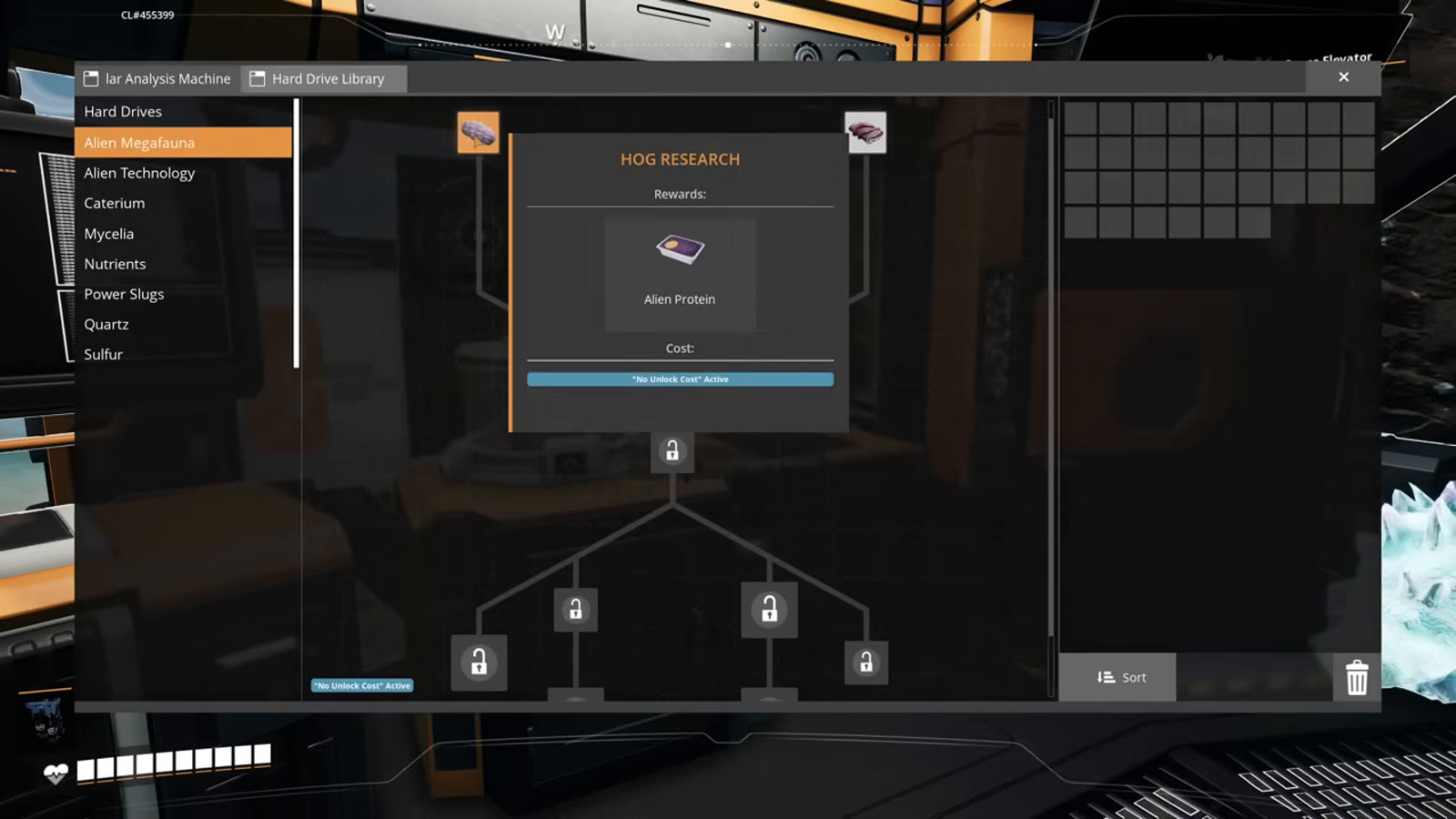
The Molecular Analysis Machine (MAM) unlocks with the Tier 1 "Field Research" milestone, alongside the map, the Object Scanner, the personal locker, and three extra inventory slots. Every research category inside it starts locked until you feed it the specific item it wants — you're not choosing what to research so much as discovering it by bringing back the right material.
What unlocks each research category

Each MAM category needs a specific item the first time, then unlocks its full branch of further research:
| Category | Unlocked by bringing back |
|---|---|
| Alien Megafauna (hostile alien organisms) | A creature corpse (Hog, Hatcher, Spider, or Spitter remains) |
| Alien Technology | A Mercer Sphere, a SAM ore node sample, or a Somersloop |
| Caterium | A Caterium ore rock |
| Mycelia | Mycelia (mushrooms) |
| Nutrients | Bacon Agaric, Paleberry, or Beryl Nut |
| Power Slugs | A blue Power Slug |
| Quartz | Quartz Crystal |
| Sulfur | Sulfur |
Research your MAM tree slowly and deliberately rather than unlocking everything at once — the game's AI assistant ADA reacts (half-jokingly, half-condescendingly) if you burn through unlocks too fast, which is a hint the game intends this to be paced out rather than dumped all at once.
The two best early unlocks: Production Amplifiers and Power Augmenters

Two of the strongest rewards in the whole MAM tree both sit behind the Alien Technology branch (which starts from a Mercer Sphere, SAM sample, or Somersloop): the Production Amplifier, which lets a machine output more items without consuming more input, and the Power Augmenter, which generates up to 500 MW of power on its own plus a 10% boost to your entire power grid once connected. Both are gated behind reaching "Alien Energy Hardening" deeper in that branch, so it's worth prioritizing Alien Technology research once you have the raw materials for it.
Finding Hard Drives at Crash Sites

Hard Drives are found at Crash Sites — wrecked drop pods scattered across the map, usually guarded by hostile creatures and sometimes surrounded by radiation. There's no single reliable list of exact Hard Drive locations in this guide; the video treats them as something you stumble on while exploring, spotted on the map or with the Object Scanner rather than farmed from a fixed set of coordinates. Opening a Crash Site's container isn't always free: some need a specific item (Aluminum Casings, for example), some cost power, and some are free to open outright. Whatever it costs, you'll want to check before committing if you're not carrying the right materials.

Scanning Hard Drives and rerolling recipes

Bring a Hard Drive back to the MAM's Hard Drive Library and scan it to reveal two possible recipe rewards. You don't have to take the first result: if neither recipe looks useful, you can rescan for a different pair instead of committing.

Rerolling has a catch: picking one of the two rewards consumes that scan and only then frees up a rescan slot — you can't infinitely reroll a single Hard Drive without ever committing to a result. If you genuinely dislike both options on a rescan, it's fine to just leave that Hard Drive sitting in the library unresolved; it isn't wasted; you can come back to it later.

How this guide was fact-checked
This guide is transcribed directly from the source video's on-screen MAM tree and Hard Drive Library UI (Update 1.1, 2025-11-14) — the category list, unlock materials, Production Amplifier/Power Augmenter mechanics, and the scan/rescan behavior all come from frames capturing those exact menus rather than from memory or outside sources. Per the Content Plan notes, roughly half of the source video actually covers the AWESOME Shop rather than the MAM/Hard Drive material; this guide intentionally trims that half down to a single pointer, since the AWESOME Sink & Coupons topic is covered as its own separate guide on this site.
What this guide doesn't answer
This guide doesn't give a specific recommended research order beyond flagging Alien Technology as the highest-value branch — which category to prioritize after that depends heavily on what materials you happen to have on hand early, and the source video treats it as opportunistic rather than following a fixed sequence. It also doesn't detail AWESOME Shop purchases, coupon farming, or the specific point values of sunk items — see this site's AWESOME Sink & Coupons guide for that half of the system.
Frequently asked
How do I unlock the MAM in Satisfactory?
The MAM unlocks with the Tier 1 'Field Research' milestone, alongside the map, the Object Scanner, the personal locker and three extra inventory slots.
What items unlock each MAM research category?
Alien Megafauna needs a creature corpse (Hog, Hatcher, Spider or Spitter remains); Alien Technology needs a Mercer Sphere, SAM sample or Somersloop; Caterium needs Caterium ore; Mycelia needs mushrooms; Nutrients needs Bacon Agaric, Paleberry or Beryl Nut; Power Slugs needs a blue Power Slug; Quartz needs Quartz Crystal; Sulfur needs Sulfur.
Which MAM branch should I research first?
Alien Technology is generally the highest-value branch, since it leads to both the Production Amplifier (doubles output without extra input) and the Power Augmenter (up to 500 MW of power plus a 10% grid-wide boost) once you reach Alien Energy Hardening.
Where do I find Hard Drives in Satisfactory?
Hard Drives come from Crash Sites — wrecked drop pods scattered across the map, often guarded by hostile creatures. Opening a Crash Site's container can require a specific item like Aluminum Casings, cost power, or be free, so check what a site needs before committing.
Can I reroll a Hard Drive if I don't like its recipes?
Yes, but with a catch: scanning gives two recipe options, and picking one first is what frees up a rescan slot for a different pair. You can't reroll a Hard Drive indefinitely without ever committing to a result.
Read next
Satisfactory Somersloop Guide: Power Augmenter & Production Amplification
All 106 Somersloops in Satisfactory explained: exact Alien Power Augmenter math, Production Amplifier slot counts by building, and which recipes actually deserve a Somersloop.
Satisfactory Overclocking & Power Shards Guide
Satisfactory Phase 5 & Endgame Guide: Compact Blueprints for Project Assembly
Satisfactory Space Elevator Phase 1 Guide: The Full Iron Build
A full building-by-building walkthrough of the iron megafactory needed for Space Elevator Phase 1 in Satisfactory: smelters, screws, rotors, reinforced iron plates and the exact Smart Plating recipe.