
If you want to manually install mods for Total War: Warhammer III on Steam, you only need to place the mod pack file in the game’s data folder. Mods installed this way will show up in the basic launcher; you can use a separate mod manager for easier handling and precise load order if needed.
Quick answer
| What | Answer |
|---|---|
| Mod file type | pack file |
| Install folder | data folder |
| Base launcher support | CA mod loader |
| Extra tool | Warhammer 3 mod manager |
| Load-order control | drag and drop |
| Best source for special cases | the Discord |
Find the game files and open the data folder
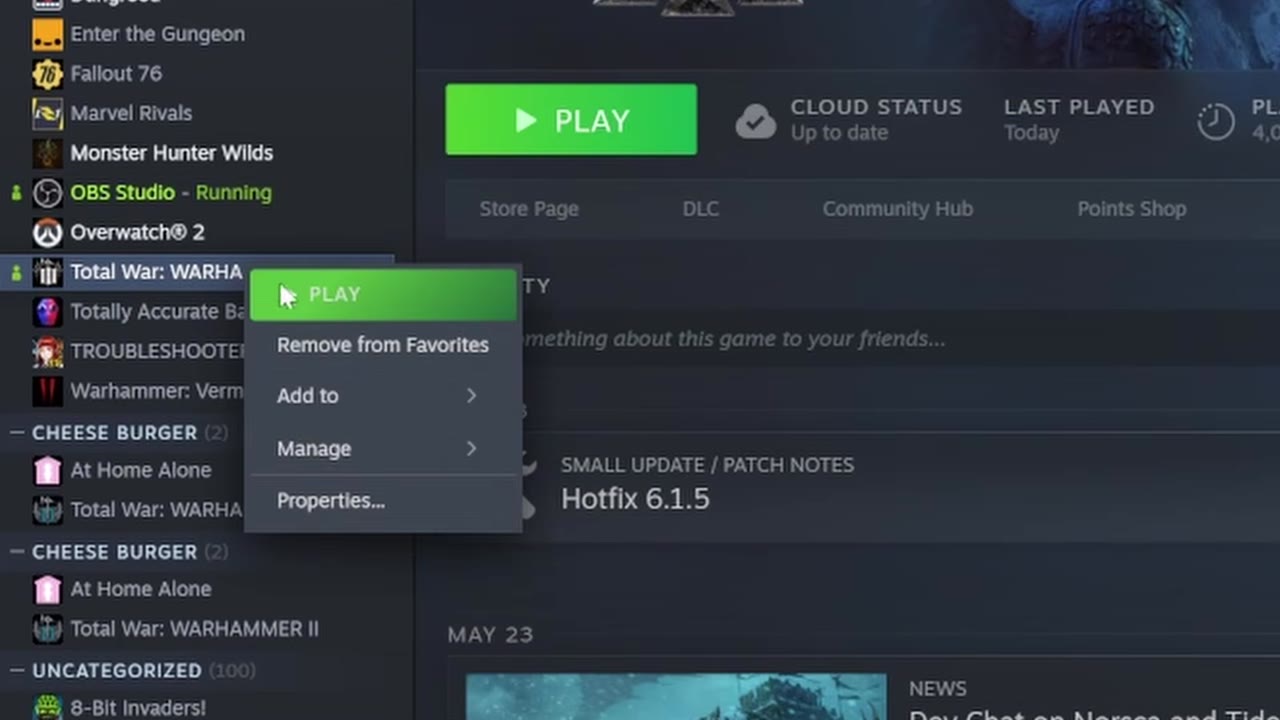
To install mods manually, begin by locating the game's installation directory through Steam.
- Opens the game’s context menu.
- Opens the install folder in File Explorer.0:30
- This is where the mod files go.

Copy the mod pack file into the data folder
Mods for Total War: Warhammer III are distributed as pack files. Placing them into the data folder is all that’s required for installation.
- Manual mods always use this file type.0:30
- Once copied, the mod functions as if installed by Steam Workshop.0:59

Use the basic mod loader
Manually installed mods will appear in the game’s default launcher, known as the CA mod loader. You do not need to unpack or extract anything further. Mods copied to the data folder are detected automatically, and you can enable or disable them from the launcher screen before starting the game.

Install and open the Warhammer 3 mod manager
For more control over mod organization and troubleshooting, you can use an external manager.
- The manager is commonly found via community links or mod sites.0:59
- Runs independently from the game launcher.
- Mod entries may not show an icon but appear by file name.1:18

Change mod load order when needed
With the mod manager, you can adjust the load order by dragging mods into different positions. This is important for mods that must override others or need to load before/after specific files, though most mods do not require a precise order. When a mod does require priority, its description will usually include instructions.
Some mods may not display an icon in the manager; this is normal and you should rely on the mod’s name to confirm it is present. Drag and drop is the usual method for changing the order. If you encounter conflicts, try changing position or disabling other mods.

Get help with edge cases
If you encounter issues during installation or activation, or if your mod setup involves special cases not covered here, community Discord servers are valuable resources. There you can ask questions, get troubleshooting help, and find detailed instructions for mods that require more advanced steps. The guide does not name a specific website for finding mods, so for rare or “nonstandard” mods, check Discord or ask the community directly.
Community Discord servers are an excellent fallback for mod installation problems or locating rare mods. You can ask for technical advice, specific instructions, or mod sources directly from experienced players.
Also worth knowing
- Epic Games version support differs. Manual mod installation works as described for Steam, but the Epic Games version may not handle mods the same way. Some users report mods appear in management tools but do not activate, and disabling them can require extra steps.
- Mod conflicts and crashes. Running a large number of mods can cause crashes. If your game becomes unstable after 30–50 turns, consider checking your load order or reducing total mod count — the problem may be caused by conflicting mods.
- Finding mods. This guide does not specify a mod site. If you are unable to find mods on common sources like Nexus, ask on Discord or check community links for mod repositories.
Frequently asked
Where do Total War: Warhammer III mods go on Steam?
Open the game’s local files, find the data folder, and place the pack file there. After that, the mod should appear in the default CA mod loader.
What file type do I need for a manual mod install?
The mod needs to be a pack file. The file is copied directly into the data folder rather than unpacked into multiple folders.
Do I need a mod manager for Total War: Warhammer III?
No, manual installation works without one. A separate mod manager can make it easier to see mods and change load order.
Why does a mod not show an icon in the mod manager?
That can be normal. The file can still appear by name even if it is black and has no icon, and it can still be moved in the load order.
Read next
Total War: Warhammer 3 Siege Guide 2026: How to Attack and Defend Settlements
This guide covers a fast settlement-siege tactic built around drawing defenders away from the victory point and capturing it with a small mobile force. It is for players who want to end sieges quickly, especially when autoresolve or prolonged assaults are undesirable.
Total War: Warhammer 3 High Elves Guide: Patronage, Influence and the Intrigue Game
This plan covers the shared High Elf mechanics in Immortal Empires and how each legendary lord changes the campaign plan. It is for players who want to choose a lord, understand the faction systems, and know what to prioritize early.
Total War: Warhammer 3 Lizardmen Guide: Geomantic Web, Rites and Blessed Spawnings
A practical early-to-late campaign plan for Kroq-Gar and the Last Defenders, focused on surviving the opening wars, building efficient armies, and scaling into a Stegadon-heavy late game. It is for players who want a clear path through the faction’s early economy, unit choices, heroes, and research priorities.
Total War: Warhammer 3 Hero-Only Campaign: How Far Heroes Alone Can Carry You
Plan a hero-only campaign around factions that can grow hero capacity quickly, with Skaven and Throt as the core example. The sections focus on early survival, hero recruitment, settlement expansion, and when the strategy starts to fall apart.