
🎯 The core idea
Trading in Path of Exile 2 runs through Ange, the Act 4 NPC you invite to your hideout. Swap orbs and other stackables on the Currency Exchange, buy gear from other players' Merchant's Tabs through the in-game Market or the official trade site, and price your own drops with a Shift+Alt click before you list them. A loot filter such as NeverSink's, tuned on FilterBlade, hides the junk so you only pick up what is worth keeping or selling.
Version note: Written for 0.5.x, reviewed 2026-11-17 — 1.0 launches on December 11 with a new challenge league, Conquerors of Wraeclast, and both Runes of Aldur and the Forbidden Rites event end alongside it. A new league means a fresh economy, so every price, exchange ratio and listing you see today resets. The official 1.0 announcement lists no changes to the trade systems themselves. 1.0 adds new items, so update your loot filter once its author releases a 1.0 version. The gold cost table below is the wiki's 0.5.x data.
- free costs nothing
- cheap small cost
- setup needs preparation
- grind pays off slowly
- skip the thing to stop doing
Three ways to trade in Path of Exile 2

This PoE2 trade guide covers three systems, and you will use all of them. Two are run by Ange, who joins you in Kingsmarch in Act 4 and can then be invited to your hideout. Asynchronous trade also needs a hideout; if you don't have one yet, finish the quest Hostile Takeover first.
| Method | What it is for | How it works | What you need |
|---|---|---|---|
| Currency Exchange | Orbs, shards, runes, essences, omens, soul cores, catalysts, distilled emotions, uncut gems, boss invitations | You place an order ("I want" / "I have"); it fills automatically, even while you are offline | Ange and gold |
| Instant buyout (asynchronous trade) | Gear, uniques, jewels, anything that isn't stackable | Buyer finds the item in The Market or on the trade site, travels to the seller's hideout and buys it from Ange, even if the seller is offline | Seller: a Merchant's Tab. Buyer: gold for the fee |
| In-person trade | Negotiated or very expensive items | Buyer whispers the seller, gets a party invite, visits and uses the trade window | Both players online; seller lists from a public Premium Stash Tab |
Gold is what makes the first two work. It drops everywhere, is shared by all your characters in the same league, and can't be traded or given to anyone. Every Currency Exchange order and every instant buyout costs gold on top of the price.
The trade window itself works like Path of Exile 1: right-click a player in the same area, choose Trade, put items in and both press Accept. If either side changes anything, both accepts reset, so always reread the other side's items before you accept a second time.
PoE2 currency exchange: swapping orbs and stackables

cheap The PoE2 currency exchange is the fastest way to turn currency you don't need into currency you do. Ctrl+left-click Ange to open it. Pick what you want in the "I Want" box and what you're paying with in "I Have". If orders already exist for that pair, the Market Ratio box shows the going rate. You can Ctrl+left-click an item in your inventory to fill "I Have", and the exchange pulls from your stash as well as your inventory.
When you press Place Order, the gold cost is taken and your items sit in the order until someone fills it. When it fills, Ange gets a yellow icon and you collect the result with Ctrl+right-click. Cancelling returns your items.
Two habits save the most currency:
- Hold Alt over the Market Ratio to see the competing orders. If you price a little better than the best order, you will usually trade faster; if you price greedily, the order may wait for hours or never fill as the market moves.
- Check your gold before big orders. Buying costs gold for every item you receive, per the table below, so large orders of Divine Orbs or anything pricier need a real gold reserve.
| Item bought on the exchange (0.5.x) | Gold per item |
|---|---|
| Scroll of Wisdom | 1 |
| Orb of Transmutation | 50 |
| Regal Orb, Exalted Orb | 120 |
| Chaos Orb, Vaal Orb | 160 |
| Orb of Augmentation, Orb of Alchemy | 200 |
| Divine Orb | 800 |
| Orb of Chance, Orb of Annulment, Artificer's Orb | 1,000 |
| Mirror of Kalandra | 25,000 |
What each orb actually does, and which ones to keep for crafting, is in our PoE2 currency guide. Most gear listings you'll see are priced in Exalted or Divine Orbs, so those are the safest currencies to hold.
Buying gear on The Market

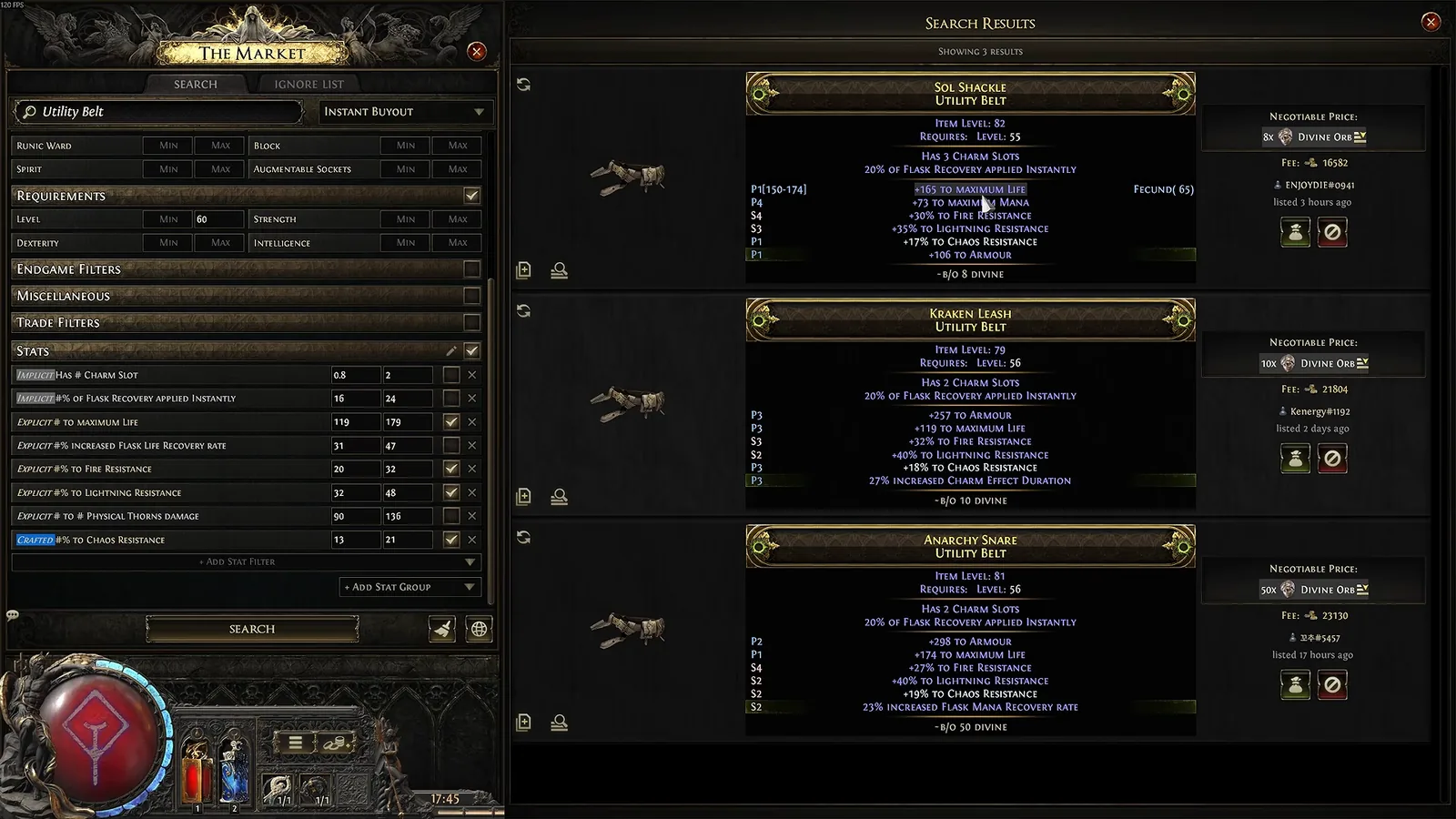
free Open The Market panel (default key /) to search every listed item without leaving the game. Type a base or unique name, add stat filters, and set the status filter to Instant Buyout if you want items you can buy right now.
Each listing shows the asking price, the Fee in gold, the seller's account and how long ago it was listed. Press Travel to Hideout and you arrive in the seller's hideout next to Ange, where the item you picked is highlighted with a purple border. Pay the price plus the gold fee and it's yours, even if the seller is offline. While you're there you can browse the seller's other Merchant's Tabs.
A few things worth knowing:
- The fee is gold, not currency, and it goes to no one; the seller still gets the full price. It rises with the item's value.
- Use Ignore Player on sellers who list items as bait or never seem to have them.
- Buyers can't start a direct trade with the hideout owner while visiting to buy (a 0.5.1 change that blocks a common scam setup). If someone asks you to "trade instead", leave.
PoE2 trade site and stat filters

The official PoE2 trade site at pathofexile.com/trade2 searches the same listings as The Market, in a browser, which is handy on a second monitor.
Before you search anything, check the league dropdown and make sure it matches the league your character is in. Standard, Hardcore, the challenge league and events like Forbidden Rites each have their own economy, and prices between them are completely different.
The filters that matter most:
| Filter group | Use it for |
|---|---|
| Type, requirement and miscellaneous filters (category, rarity, level, item level, quality) | Narrowing to the right slot and base; item level decides which modifier tiers an item can roll |
| Stat filters with min/max | The modifiers that make an item valuable, e.g. life or a resistance between two values |
| Pseudo stats (such as total elemental resistance) | Comparing items whose resistances are split differently: +40% fire is as good as +40% cold for most buyers |
| Trade filters (listed time, buyout price, status) | Hiding stale listings, pricing in one currency and choosing instant buyout or in-person |
Add one or two stats at a time. A search with every modifier ticked usually returns nothing, which tells you nothing about the price.
Selling with Merchant's Tabs

setup To sell through instant buyout you need a Merchant's Tab. They aren't free: you buy them in the shop, or convert a Premium Stash Tab you bought before August 29, 2025 on the account page of the website. The conversion can't be undone. Merchant's Tabs don't exist in solo self-found modes. Ctrl+Alt+click Ange to open them.
Price every item individually, in one currency of your choice. There is no tab-wide price like on a Premium Stash Tab, but the window remembers the last price you used. After you list an item there is a short delay before it shows up for buyers, and a cooldown before you can take it out or change its price. That cooldown restarts whenever a new player joins your hideout.
When something sells you get a notification, Ange shows a yellow icon, and the currency waits in a remove-only Earnings tab. Collect it regularly: if the earnings space fills up, Ange shows a red icon and you can't list anything new until you empty it.
How to set the price is the hard part. Search for items like yours and look at the cheapest few listings that are a few days old or newer. If yours hasn't sold in a day or two, lower the price. The price-checking sections below show what to compare.
PoE2 price check in game with Shift+Alt

free Since 0.5.0, hovering any item and pressing Shift+Alt+click opens The Market with filters already filled in from that item. For a rare, each modifier becomes its own filter, so you can switch them on and off and watch which one moves the price. The item's hover hint lists the shortcut next to Inspect (Alt) and Compare (Shift).
Read the result with care, though. In the video's example, a belt with life and two resistances came back with no results, most likely because almost every modifier was ticked with a tight range. That doesn't mean the item is worthless or priceless; it means the search is too narrow. Untick the minor modifiers, widen the ranges, and search again.
For currency and other stackables you don't need a price check at all: the Market Ratio in the Currency Exchange already is the price.
Price check tools and the settings that cost you currency

The Shift+Alt Market check is enough for most items, but many players keep a price checker open next to the game. The one in this frame is PoE Overlay II, the Path of Exile 2 version of PoE Overlay, installed through Overwolf (a standalone build also exists). You hover an item, press its price-check hotkey, and it queries the official trade site and shows matching listings plus an estimated value without leaving the game. Exiled Exchange 2 does the same job without Overwolf. Neither is made by Grinding Gear Games, so install them only from their official pages (the Overwolf store or the developer's site).
Whichever tool you use, three settings decide whether its prices mean anything. The video's creator lists them as the most common price-check mistakes:
- League. A tool still set to last league or Standard gives you prices from a different economy. Change it every new league.
- Instant buyout only. In-person listings are often fake low prices meant to mislead, or never answered. Instant buyout listings are items you can actually buy.
- One currency. Price in Exalted or Divine Orbs. Listings in volatile currency can make an item look cheap or expensive when it isn't.
Treat "estimated value" numbers as a starting point. In the frame the overlay itself rates its estimate's reliability as Very Low.
Reading a price check: listing age and modifier tiers

grind Two things on a price check tell you more than the price column.
How long it has been listed. Something listed 16 days ago at a high price is evidence that nobody pays that price. Sort by price and look at what was listed recently: those are close to what sells. The video's rule of thumb is to search listings up to about a week old, and price below the cheapest fresh listing if you want a sale within a day.
Modifier tiers. Price-check tools label each modifier as a prefix or suffix and its tier (P1, S2 and so on, tier 1 being the best a dropped item can roll). Items with several top-tier modifiers on the stats people want are what sell for real currency. A rare with one great modifier and five weak ones is usually worth what the one modifier is worth.
| What you see | What it usually means |
|---|---|
| Many similar items, all listed for weeks | Asking price is too high; price below the crowd |
| No results with every modifier ticked | Search is too strict; remove minor stats |
| Few results, all fresh and expensive | Rare combination; list high and lower slowly |
| Item level below the top tier threshold | Can't roll the best modifiers; worth less to crafters |
Bases, build demand and what actually sells

The same stats are worth very different amounts on different items. Item level decides which modifier tiers a base can roll, so a high item level rare of a popular base can be worth more than a finished rare with mediocre stats. Base type matters too: two bows with the same modifiers sell for different prices if one base is the one builds want.
To see what people want, look at what builds use. poe.ninja's builds page (shown here) lists which bases and uniques the top characters in the current league wear. If a base you found appears there a lot, price check it even if it's a magic or white item. The mechanics behind item level and modifier tiers, plus base crafting, are covered in the PoE2 currency guide; the builds you'll see on poe.ninja are summarised in our PoE2 best builds for endgame guide.
skip Don't spend Regal or Exalted Orbs "finishing" a magic item before selling it; the video makes this point with a magic helmet. A magic item with one great modifier on a good base is often worth more as a crafting base than after you roll random extra modifiers on it.
PoE2 loot filter: what it does and how to set one up online

free A PoE2 loot filter changes how items on the ground look: their colour, label size, border, sound, minimap icon and light beam. It can also hide items you never want to see. By default the game hides nothing, which is why the ground fills with clutter in maps. Filters are allowed and use the game's own filter language; they are not mods.
You don't need to download or copy any files any more. Filters live on your Path of Exile account and the game loads them from there:
- Follow a ready filter. On the Path of Exile website, open the item filter list, find NeverSink's filter and follow it. It appears in your in-game filter list and updates itself. This also works on console.
- Customise and sync it. On FilterBlade, log in with your Path of Exile account, pick Path of Exile 2, a strictness and a style, then use Save & Sync to send it to your account (PC, Xbox or PlayStation).
- Select it in game. Open Options, go to the Game tab and choose the filter from the item filter dropdown. If a freshly synced filter isn't listed yet, restart the game.
A synced filter overwrites the same slot on your account each time, so the only reason to still use a local .filter file (in Documents\My Games\Path of Exile 2) is running different filters on different characters, or editing one by hand. If you do edit filters: a filter is a list of blocks read from top to bottom, and the first block that matches an item decides how it looks, unless that block uses Continue.
PoE2 FilterBlade and NeverSink's strictness levels

NeverSink's filter is the one most players use, and PoE2 FilterBlade (filterblade.xyz) is its companion site. The filter ranks currency, runes, soul cores, catalysts, distilled emotions, essences, omens and fragments into economy-based tiers using market data like the price list in this frame, so valuable drops look and sound different from cheap ones.
The key choice is strictness, which sets how much is hidden:
| Strictness | When to use it |
|---|---|
| Soft, Regular | First character, or if you want to see almost everything |
| Semi-Strict | The recommended start for new players, and FilterBlade's default |
| Strict | Early maps, once you know what you're looking for |
| Very Strict, Uber Strict, Uber Plus Strict | Late endgame only; NeverSink warns not to level with Very Strict or above unless you're already in strong gear |
The same filter handles the campaign and the endgame: it switches from levelling mode to endgame rules at area level 65, and adjusts which bases it highlights as map tiers rise.
setup On FilterBlade you choose strictness, game mode and a style, preview the result in its loot simulator, and sync it straight to your Path of Exile account as described above. Things to remember:
- Followed filters update themselves; a synced FilterBlade filter updates when you sync again. NeverSink updates the filter a few hours before each league starts, so re-sync on league day. Only a downloaded file from GitHub stays frozen.
- A pink or cyan label means the filter doesn't know the item. That usually means the game added something new and your filter needs an update.
- A filter can't tell uniques on the same base apart. It sees "unique belt", not which unique, so always pick up uniques you haven't identified and check them.
Read next
- PoE2 currency guide: orbs and crafting for beginners
- Path of Exile 2 beginner guide: everything new players need
- PoE2 beginner mistakes and how to avoid them
- PoE2 best builds for the endgame meta
- Path of Exile 2 1.0 release: date, free-to-play and what's new
More Path of Exile 2 guides are on the Path of Exile 2 hub.
How this guide was fact-checked
- No source video: no suitable 30-minute or longer video covered this topic for the current patch, so this guide was written from written sources. The screenshots come from "STOP Losing Currency in POE2 Price Checks" by Spud the King – Builds & Guides (uploaded June 29, 2026, 31 minutes, recorded in Runes of Aldur on 0.5.x). Price-check advice credited to "the video" (league, instant buyout only, one currency, listing age) is that creator's.
- Official source (wins over everything else): Grinding Gear Games' Steam announcements for Path of Exile 2: the 0.5.0 "Return of the Ancients" content update notes (Shift+Alt market search), the 0.5.2 to 0.5.4b patch notes (Currency Exchange and Market fixes), "What We Are Working On" (controller trade changes), the Forbidden Rites FAQ (which leagues end at 1.0) and "Path of Exile 2 Full Release on December 11" for the version note.
- Community wiki (poe2wiki.net): Trading, Asynchronous trading, Currency exchange market (gold cost table and exchangeable item types), Ange (unlock, hideout shortcuts, earnings icons), Stash (Merchant's Tab conversion rules), Gold and Item filter (file location, block rules, version history).
- NeverSink / FilterBlade: the README and changelog of NeverSinkDev/NeverSink-Filter-for-PoE2 on GitHub (strictness levels, install paths, update advice, unknown-item colours, area level 65 switch) and the FilterBlade site (default strictness, loot simulator, download or sync).
- Corrections and notes:
- The wiki still names the buy button "Secure Item"; in the 0.5 client shown in the screenshots it reads Travel to Hideout.
- The wiki says the asynchronous trade gold fee depends on the item's value, but the exact formula isn't public, so no fee numbers are given here.
- The official trade site's help page could not be loaded (it blocks automated requests), so the trade site filters are described from the screenshots and the in-game Market, which uses the same filter groups.
- Dropped: all of the video's item prices (belts, boots, crossbows, rings), because they belong to one league's economy and reset at 1.0.
What this guide doesn't answer
- What specific items are worth right now: prices change daily and reset with the 1.0 league; use the tools above on the day you sell.
- Crafting items to sell: a topic of its own; start with the currency guide above.
- Writing a loot filter from scratch: the filter language has dozens of conditions; the PoE 1 item filter documentation the wiki links to covers them.
- Mirror services and crafting commissions: these are niche, high-value trades done in person through the community.
- Solo self-found play: SSF characters can't trade at all, so none of this applies; the beginner guide explains the modes.
Frequently asked
How do you trade in Path of Exile 2?
Reach Act 4, meet Ange in Kingsmarch and invite her to your hideout. Ctrl+click her for the Currency Exchange, where orbs and other stackables trade automatically for a gold cost. For gear, search The Market (default key /) or the trade site, then use Travel to Hideout to buy from another player's Merchant's Tab, even while they are offline. Buyers pay the price plus a gold fee.
How does the PoE2 Currency Exchange work?
Open it by Ctrl+clicking Ange. Choose an item in I Want and one in I Have; the Market Ratio shows the current rate, and holding Alt over it shows competing orders. Place Order takes the gold cost and holds your items until another player fills the order, even if you are offline. Collect the result with Ctrl+right-click. Cancelling returns your items.
How do I price check items in PoE2?
Hover the item and Shift+Alt+click. The Market opens with filters taken from the item, and on rares you can turn each modifier on or off to see which one sets the price. Untick minor modifiers if nothing comes up, set the status to instant buyout, and compare against recent listings in one currency, ideally Exalted or Divine Orbs. Old listings at high prices usually haven't sold.
Do I need a Merchant's Tab to sell items in PoE2?
Yes, to sell through instant buyout. Merchant's Tabs are bought in the shop, or converted from a Premium Stash Tab bought before August 29, 2025. Without one you can still sell currency on the Currency Exchange or trade in person. You price each item individually, and the currency goes to an Earnings tab you collect from Ange.
What is the best loot filter for PoE2 beginners?
NeverSink's filter on Semi-Strict, which its author recommends for new players and which FilterBlade uses by default. Subscribe to it on the Path of Exile website so it updates itself, or customise it on FilterBlade and sync it to your account. Very Strict and above hide too much while levelling. If an item shows a pink or cyan label, update your filter.
Read next
PoE2 Campaign Guide: Acts 1-4, Interludes and Boss Tips
An act-by-act Path of Exile 2 campaign guide for Acts 1-4 and the three Interludes: the bosses that kill new players, permanent quest rewards worth the detour, and when to swap gems and gear before maps.
PoE2 Beginner Mistakes: 13 Fixes Every New Player Needs
Thirteen common Path of Exile 2 beginner mistakes, from neglected resistances and risky sprinting to missed quest passive points and unread support gems, each with the fix. Checked against the poe2wiki and official 1.0 news.
PoE2 Best Class for Beginners: Every Class and Ascendancy
Which Path of Exile 2 class and ascendancy a new player should pick, judged on range, defences, button count and cost rather than ladder popularity. Covers all eight classes, a 0.5 ascendancy tier list and what 1.0 changes.
Path of Exile 2 Beginner Guide: Everything New Players Need
A Path of Exile 2 beginner guide that takes a new character from the league screen through Act 1: which league and mode to pick, how skill gems, Spirit and the passive tree work, how to judge upgrades and stay alive. A version note flags what the 1.0 release on 11 December 2026 changes.