
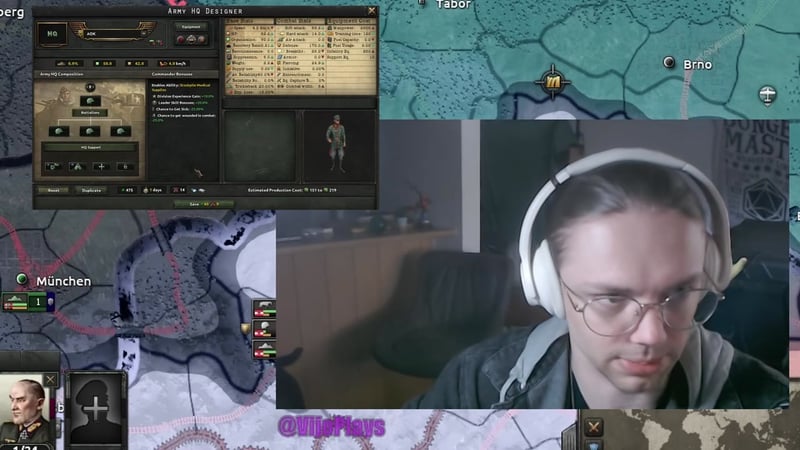
Deploying an Army HQ in Hearts of Iron IV after the Thunder at Our Gates expansion is a short sequence: design a template inside the width cap, attach a commander, and put the HQ on a front line where its bonuses actually reach your divisions. This guide walks that sequence step by step, then covers what an HQ costs, where the commander should stand, and what happens when the enemy captures him.
Quick answer
| What | Answer |
|---|---|
| Where an HQ is built | The Army HQ Designer |
| Width cap | 8 combat width, and a single battalion type only |
| Cheapest template worth deploying | 2-width, two infantry battalions |
| Cost per infantry HQ battalion | 600 manpower, 60 infantry equipment |
| Extra cost of a bigger HQ | Each battalion added increases command power cost |
| Where an HQ can be assigned | Front lines only — not fallback lines |
| Where to stand the commander | On the front line for full bonuses; one tile back costs -5% max planning |
| If the HQ is caught | The commander is moved to the capturing country's nearest victory point |
How to deploy an Army HQ
The order matters, because two of these steps are expensive to undo once the HQ is on the map: the template decides what the deployment costs in manpower and equipment, and the front line you assign it to decides whether the commander's bonuses reach anything at all.
- this is the only screen where HQ size and battalion type are chosen
- mixing infantry with tanks or mobile battalions is not permitted
- 600 manpower and 60 infantry equipment per battalion; mobile battalions often cost more
- Army HQs fit a limited number of slots, and each battalion also raises command power cost
- commander bonuses only apply to divisions directly under his command
- Army HQs appear assignable only to front lines
- full planning on the line, -5% max planning one tile back
- losing the commander has significant consequences
The sibling guide on HQ support companies notes that holding shift while assigning a commander to an army also starts deploying his HQ — see HQ support companies: the best Army HQ setup.
Create a cheap Army HQ
Army HQ divisions in Hearts of Iron IV are capped at a maximum combat width of 8. They can only use a single battalion type at a time: mixing infantry with tanks or mobile battalions is not permitted. Infantry HQ battalions are considered elite units and require just 600 manpower and 60 infantry equipment each, making them economical for most purposes.
The main goal is to keep Army HQs out of direct combat, as losing your commander can have significant consequences. Tanks are generally not suited for HQs: they have low organization and hit points, cannot use motorized trucks for added stats, and burn fuel and supply unnecessarily. If you need HQ mobility, you can use mobile battalions (such as motorized) to give your commander speed — but keep in mind this often costs more resources.
The meta for cheap Army HQs in single-player is likely a minimal design: a 2-width setup with two infantry battalions. This minimizes both manpower and equipment expense, while still fulfilling the HQ role. Each battalion added increases command power cost, so it pays to keep the template lean.


- 0:01
- Each battalion costs 600 manpower, 60 infantry equipment
- Tank HQs lack org and HP, consume extra supply
- Motorized HQs allow faster movement for commander
- This is the formation cap
- Cheapest single-player template is 2-width infantry
Use commander position and proximity correctly
Commander bonuses only apply to divisions directly under their command. Placing your commander close to the front line allows divisions to receive their full bonuses and planning efficiency.
If a commander is four tiles away from the front, they effectively do not supply bonuses. The proximity setting in the HQ panel (such as "close," "medium," etc.) does not override the physical placement of your commander. Only the location relative to the actual front line matters.
Sitting the commander directly on the front line entails no penalty — your divisions receive full planning. One tile away incurs a -5% maximum planning penalty and reduced ability efficiency. Two or more tiles back may give larger maluses. Practically, positioning commanders one or two tiles behind the line is safer, avoiding unnecessary risk while still delivering most bonuses.


- Commander bonuses only apply to assigned divisions
- No penalty at zero offset 9:22
- -5% max planning, reduced ability efficiency 10:04
- Physical placement is what determines bonus effect 10:33
- Retreat commander from combat if needed
Choose the support staff that is actually worth using
Army HQs can fit a limited number of support staff, and for a first deployment two picks cover almost everything. Hospital Group Staff is the strongest all-round choice: extra division experience gain, reduced commander wounds and sickness, and 4% casualty trickleback with the "Stockpile Medical Supplies" decision. Logistics & Service Staff rivals it when supply consumption and command flexibility are crucial — it allows two more armies under your general and gives the Exploit Breakthroughs ability, which boosts plan retention and movement speed but increases damage taken. Reconnaissance Staff unlocks Defense in Depth, which provides max entrenchment for divisions in exchange for halved max planning and persists until manually disabled, and Signal & Intelligence Staff adds +3% max planning plus the Rotating Reserves ability. Signals, Recon and Maintenance are otherwise situational, useful only with specific needs.
Which company belongs in each slot, the full company list and the tier ranking behind these picks are covered on the companion page: HQ support companies: the best Army HQ setup.


Capture and free commanders
Army HQ commanders can be captured in combat through several methods: defeating their division in battle, surrounding and overrunning them in an encirclement, or reducing their strength or organization to zero before they have a chance to retreat.
When captured, commanders are instantly relocated to the nearest victory point (VP) of the capturing nation. For example, a German commander taken in the Netherlands may be moved to Utrecht, or if taken by a distant country, potentially to a far-off VP like Quebec. This means the real location of the battle may have little relationship to where the commander ends up.

There are several methods for freeing captured commanders:
- Conduct a raid on the province where the commander is held.
- Recapture the tile to liberate your commander directly.
- Wait for the end of the war; commanders are released automatically.
- Use transport planes and spies to attempt a rescue from a single location.
These mechanics encourage both offensive action and the use of intelligence agencies in a way not previously seen in HOI4. Rescuing via spies is especially useful for commanders held far from the front.
Also worth knowing
- Many bonuses may not work as intended. Terrain XP gain, attrition reduction, and Hospital Group Staff effects are reported to not function or not display correctly on divisions.
- Army HQs appear assignable only to front lines. You cannot attach an HQ to fallback lines.
- HQ cap limits flexibility. Some players dislike that only a capped number of HQs can exist, preventing every army from having one.
- Buff lines visual may be unreliable. The dotted lines indicating which divisions a HQ is buffing do not always appear or update properly.
Frequently asked
What is the best Army HQ support company?
Hospital Group Staff is the strongest overall choice in the ranking shown here. It gives division XP gain, lowers the chance of commanders being sick or wounded, and adds casualty trickleback when using stockpiled medical supplies. Logistics is the main rival if supply consumption is the bigger problem.
How close should an Army HQ be to the front?
The closest position gives the full bonus, and moving one tile back applies a -5% planning penalty and reduces some other effects. The commander’s exact position matters, while the HQ proximity setting itself does not change the result by itself. Keeping the commander one or two tiles back is presented as the safer practical option.
How do you capture enemy commanders?
Capturing commanders happens by defeating them in battle, including encirclement, overruns, or reducing their strength and organization to zero before they retreat. Once captured, they are sent to the nearest victory point owned by the capturing country. That means the destination can be far from where the capture happened.
How can you free captured commanders?
Captured commanders can be freed by raiding the location, taking the tile they are held in, ending the war, or using transport planes and spies. The spy-based method is described as a way to free commanders from one location. It is a separate recovery route from simply winning back the province.
Read next
HOI4 Intelligence Agency Guide
How the intelligence agency works in Hearts of Iron IV: what operatives are, what the five upgrade branches buy, how cryptology and the Spy Master fit in, and why an agency started late never pays for itself.
HOI4 Country Tags
Every Hearts of Iron IV country tag, the three-letter code console commands use instead of a country's name, with the ideology each nation starts under. Includes how tag, annex and puppet take them, and why a run that uses them earns no achievements.
HOI4 DLC Guide
Every Hearts of Iron IV expansion, country pack and theater pack, with what each one adds and when it was released. Explains the difference that decides a purchase — expansions rework systems for every country, packs add focus trees for specific nations — and which DLCs are already part of the base game.
HOI4 Achievements
Every Hearts of Iron IV achievement, grouped by the expansion that added it, with what each one asks for and the country that makes it manageable. Covers the three rules that decide whether an achievement can unlock at all — ironman, console commands and mods — and six worth clearing first.