
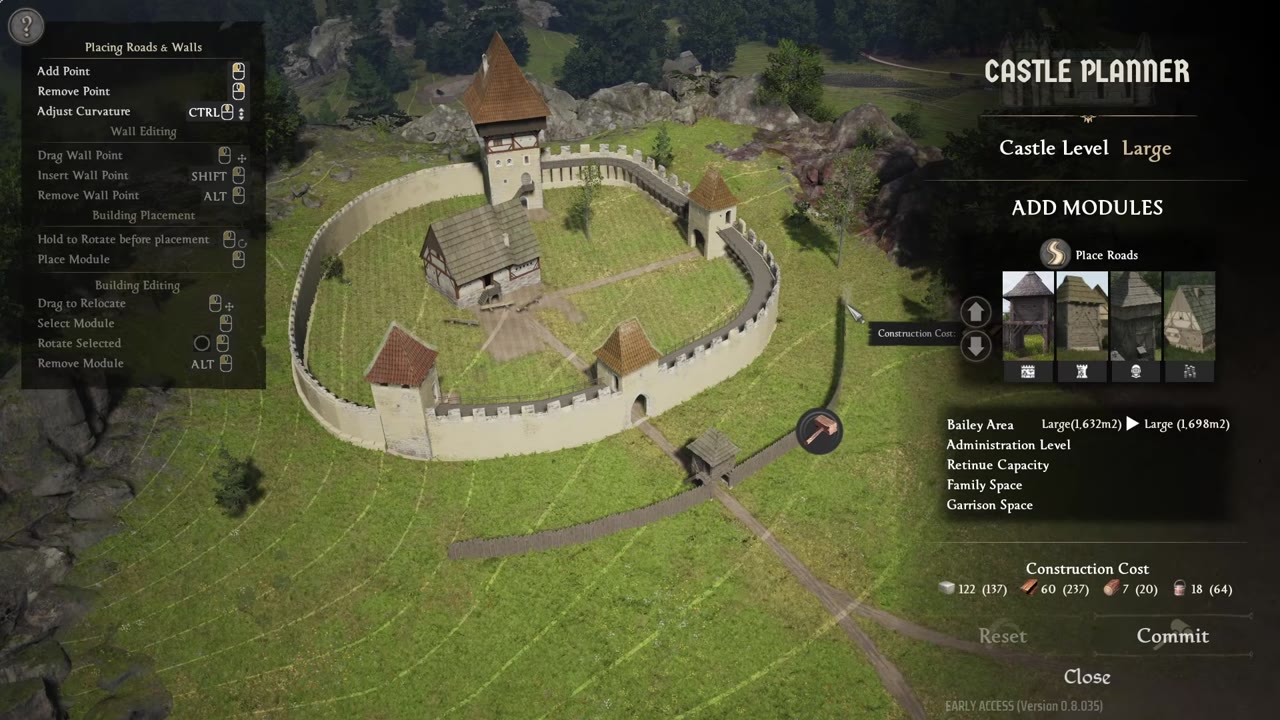
You will be able to upgrade a manor into a fortified castle in Manor Lords, use the castle planner to place walls, towers and ramparts, convert parts from wood to stone, and select the best sites on the newest maps. This guide breaks down the planner workflow, material requirements, upgrades, rampart placement specifics, build commitment, and strategic location choices—all with improvement and stability tips.
Quick answer
| What | Answer |
|---|---|
| How to start | Select the manor and open the castle planner |
| Main upgrade method | Click a part and raise it to level two |
| Rampart placement | Ramparts must face inward on the wall |
| Cost reduction perk | Strasburg Masons, -30% castle planner construction cost |
| Notable map | Jagged Cliffs |
Open the castle planner and preview the upgrade
You begin castle building by selecting your manor and opening the castle planner. This menu displays all available castle elements—walls, gates, outer and garrison towers, and the tax office—allowing you to preview your fortress design in detail. Each part placed at this stage appears as a level one wooden version, serving both as an initial build and as a preview. Closing the planner shows which elements are finished and which are only previewed, helping you keep track of the build status and see upgrades in progress.

Upgrade manor parts from wood to stone
To fortify your manor and castle, upgrade individual pieces from level one wood to level two stone. Select any castle part and use the dedicated level up/level down menu to change its upgrade state. Raising a building or wall to level two consumes the required construction materials shown in the planner, such as stone, wood, metal, clay, and mortar. You can upgrade only select parts if you’re short on supplies—committing before all upgrades are ready is allowed.


Shape walls and reconnect sections cleanly
Walls are fully customizable with the planner's wall pin system. By selecting a wall section, you reveal draggable pins along the wall, allowing you to adjust connection angles, straighten courses, or smooth sharp corners. Wall segments can be separated and snapped back together, turning them into a single unit for easier movement and modification.


Add ramparts on the inner side of the walls
Ramparts allow your units to defend from atop the castle walls, but placement is crucial—ramparts must be attached to the wall’s inner side, facing the manor. If the wall’s orientation is reversed, ramparts can end up outside the castle, exposing your defense. The wall section menu provides a second control for adding or removing ramparts or garrison portions. Always place and orient walls inward before adding ramparts to ensure proper defense.

Commit the build and plan around the material cost
Once your castle layout is finalized—upgrades, wall shapes, ramparts—the commit button locks in your design and starts construction. Building can take a long time, especially if you don't have substantial materials or enough unassigned villagers to move resources rapidly. Each upgraded castle part uses significant materials, particularly dressed stone blocks and mortar. Consider adopting the Strasburg Masons perk, which cuts castle planner construction cost by 30% and improves the stone mason station output, saving both time and resources.

Choose castle sites on the new maps
Selecting the right castle site is key to both visual impact and strategic defense. The Jagged Cliffs map offers a major cliff outcropping in the top-left region, ideal for a stronghold. Bottom-left and bottom-right areas on the same map feature cliffs near possible invasion points for added security. The lake map gives ridge spots just above the water for elevated visibility and strategic control; the top middle ridge is a recommended choice. For those revisiting older maps, High Peaks still has multiple fortress-worthy locations.


Use the castle planner safely during the beta
The castle planner features in Manor Lords remain in beta, so expect some instability—especially with garrisoning units on ramparts, which has had issues. Construction and castle design itself generally work as intended, letting you build functioning fortifications. However, saving your game while walls are under construction reportedly risks save file corruption. For best results, avoid saving during active wall builds and keep backup saves before major construction changes.

Also worth knowing
- Ramparts can be flipped to the inside post-placement. If a rampart attaches to the outside, use the rotate arrows button to shift it to the proper inner position.
- Towers should protrude outward. For best defensive coverage and to attack wall climbers from the sides, position towers so they extend beyond the wall line and cover blind spots.
- Castle planner bugs can block progress. Serious bugs—like crash-to-desktop or the planner refusing to open—sometimes require rebuilding the manor multiple times.
- Commit sometimes fails despite sufficient materials. Some players report the commit button cannot be clicked even when all required resources are supplied; if this happens, change part placements or try rebuilding affected sections.
- Upgrade features are beta-only. If you don’t see castle upgrades, verify you’re running the latest beta branch.
- Saving during wall construction can corrupt saves. Wait until walls are fully built before saving the game or keep regular backups to minimize risk.
- Collision warnings can freeze placement. When placing entrances or gates on walls, the planner can turn red and display a collision error; reposition affected parts and try again.
Frequently asked
How do you get to the castle planner?
Select the manor and open the castle planner. From there, the planner shows walls, gates, outer towers, garrison towers, and the tax office as build options. The manor must already exist before the castle upgrade path becomes available.
Can you build the stone version directly?
The castle pieces are placed as the old wooden level one version first, then upgraded to level two. You click the part you want, choose the higher level, and pay the construction materials for the upgrade. The process is not a separate stone-only placement mode.
How do ramparts end up on the right side of the wall?
The wall needs to be oriented so the rampart can attach to the inner side. If it is placed the wrong way, the rampart can end up on the outside, and the placement must be adjusted before committing construction. Some players also note a rotate or flip control can move the rampart inward.
What perk reduces castle construction cost?
Strasburg Masons reduces castle planner construction cost by 30%. It also boosts stone mason station production. That makes it a strong choice when stone block production is part of the build plan.
Read next
Manor Lords Road Curvature Guide
Learn how to shape roads in Manor Lords so they stop looking like rigid point-to-point lines. The focus is on the road curvature control and how to use it while drawing paths.
Manor Lords Hardest Achievement Guide
A structured route for surviving the hardest achievement run, from the first settlement setup to the final campaign push. It focuses on efficient early economy, approval management, trade, and the military steps needed to clear bands of enemies and claim territory.
Manor Lords Beginner Guide
A beginner guide to surviving, growing, trading, fighting, and expanding in Manor Lords. It is aimed at new players who want a practical order of operations instead of a step-by-step handhold.
Manor Lords Food, Market and Firewood Guide
This guide explains how food is consumed, how markets and granaries interact, and why firewood logistics work differently from food. It is for players who want to keep settlements supplied efficiently without wasting stalls or hauling distance.